Before you start
- Sign in with your own account. The owner must have opened the venue session. If the shift-start screen appears, select your post and enter opening cash where required.
- For table service, select the correct table. For counter collection, use the till’s counter flow. Check the service type before sending.
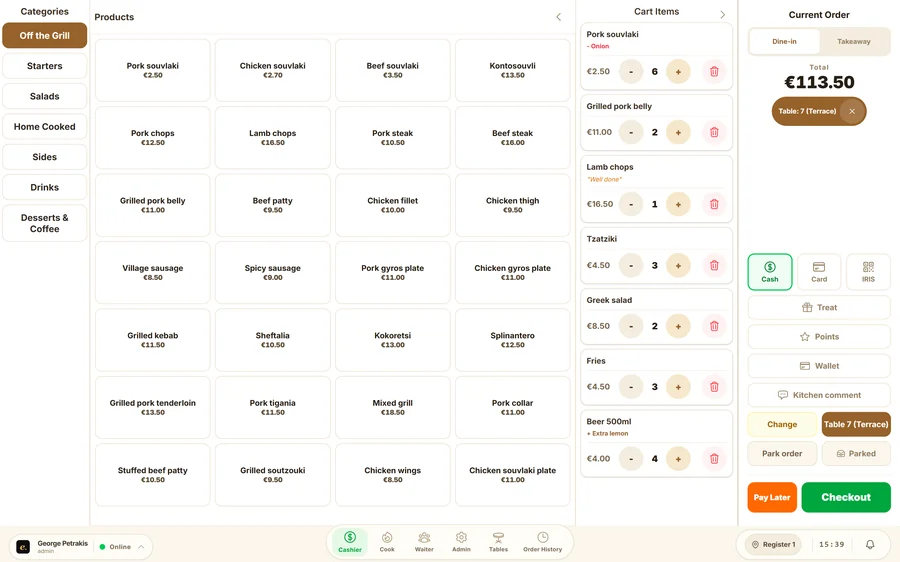
Enter and send an order
- Choose a category and item, then set the quantity and modifiers. Add notes to the relevant item so the correct station sees them.
- Check the table, items and total. Send the order and wait for confirmation. A connection-related queued status means the kitchen has not received it yet.
- To add to an open table, enter the new items against that table. To correct a sent order, use the permitted edit action and notify the kitchen.
Payment and bill splitting
- Open the table on the floor plan and review its open bill. For a split payment, select the items and quantities being paid for. Check the remaining balance before serving the next payer.
- Record the actual payment method. Choosing “Card” records how payment was taken; it does not prove a bank transaction was authorised.
- Use the floor-plan action to transfer or merge tables and check the destination bill. Release the table once the bill has been settled.
Order tickets
- The current Efaeto version does not issue fiscal receipts. The legal receipt is issued by the venue’s fiscal system. An Efaeto order ticket does not replace it.
Guide last reviewed: 24 September 2026. Available options depend on the version, user role and enabled features.